Windows 10 and 11. Xbox, PlayStation and third-party pads.

Response curves for any controller, in any game.

Shape how your sticks respond and hand the result to the game as a standard Xbox controller. Finer aim near center, full speed at the edge, zero deadzone if you want it.
Free to start Premium $9.99 a month No input you did not make
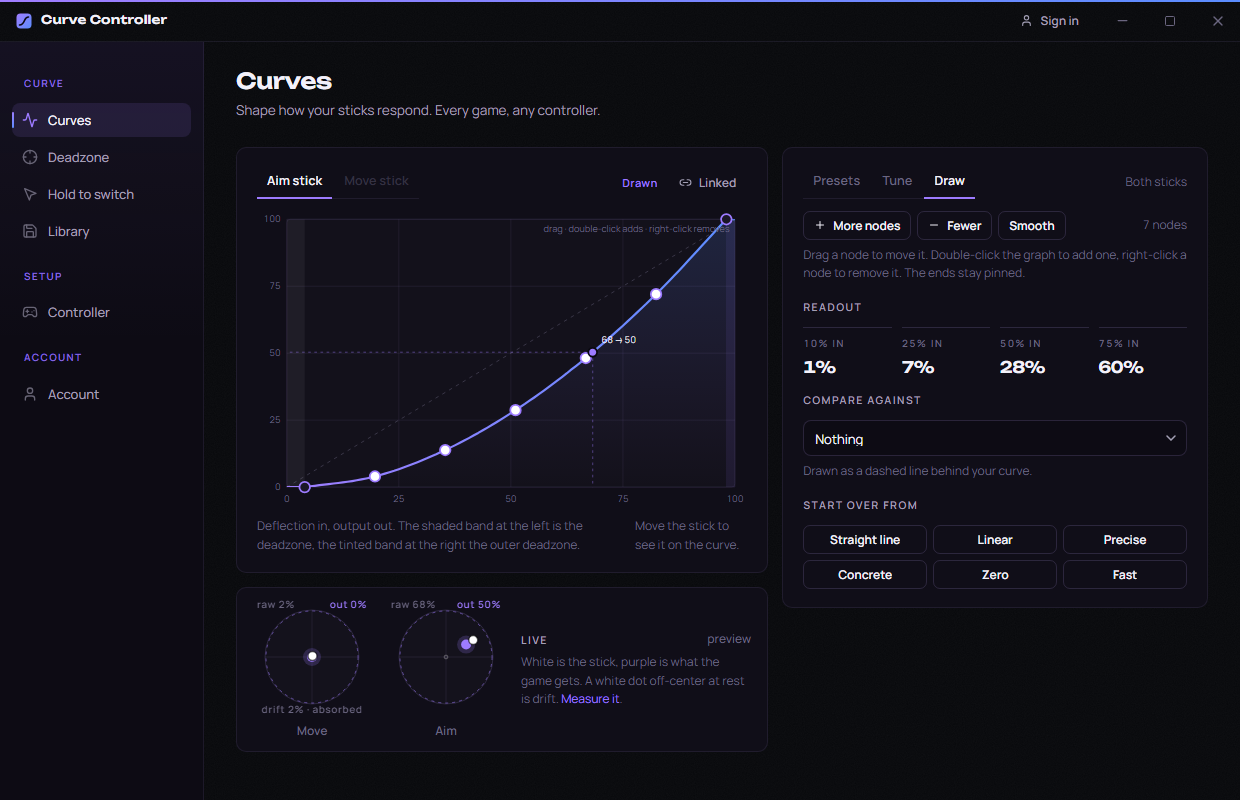
Curve Controller with a hand-drawn response curve on the Curves tab, nodes along the curve and a live view of both sticks
Every gameThe game sees a normal Xbox controller.
Any padXbox, DualSense, DualShock, 8BitDo and more.
Wired or BluetoothReads the stick the way Windows does.
No lag you can feelEvent driven, with its own timing shown in the app.
Try it here

A curve changes what a half push does.

Pick a preset and drag the deflection slider. The graph is the same maths the app runs on your stick, so this is exactly what the game would receive.

25% in
7% out
50% in
28% out
75% in
60% out
Three presets are free. The rest, the sliders, and drawing your own are part of Premium.
What you get

Built for people who notice the difference.

Every control is on one screen. Nothing is buried, nothing needs a profile per game.

01 Premium

Draw your own curve

Drag nodes on the graph and the stick follows. Start from any preset or a straight line, add nodes where you want more control, and compare against the preset you came from as a dashed line.

  • Readout at 10, 25, 50 and 75 percent so you know what a push turns into without guessing.
  • Smooth in one click when a drawn curve gets lumpy.
  • Separate aim and move curves, or link both sticks and tune once.
The Draw panel: a response curve with seven draggable nodes and a readout of output at 10, 25, 50 and 75 percent
02

A deadzone you set from evidence

See both sticks at rest, run a three second drift test, and the app suggests the smallest deadzone that hides the drift. Set it to zero and every movement counts.
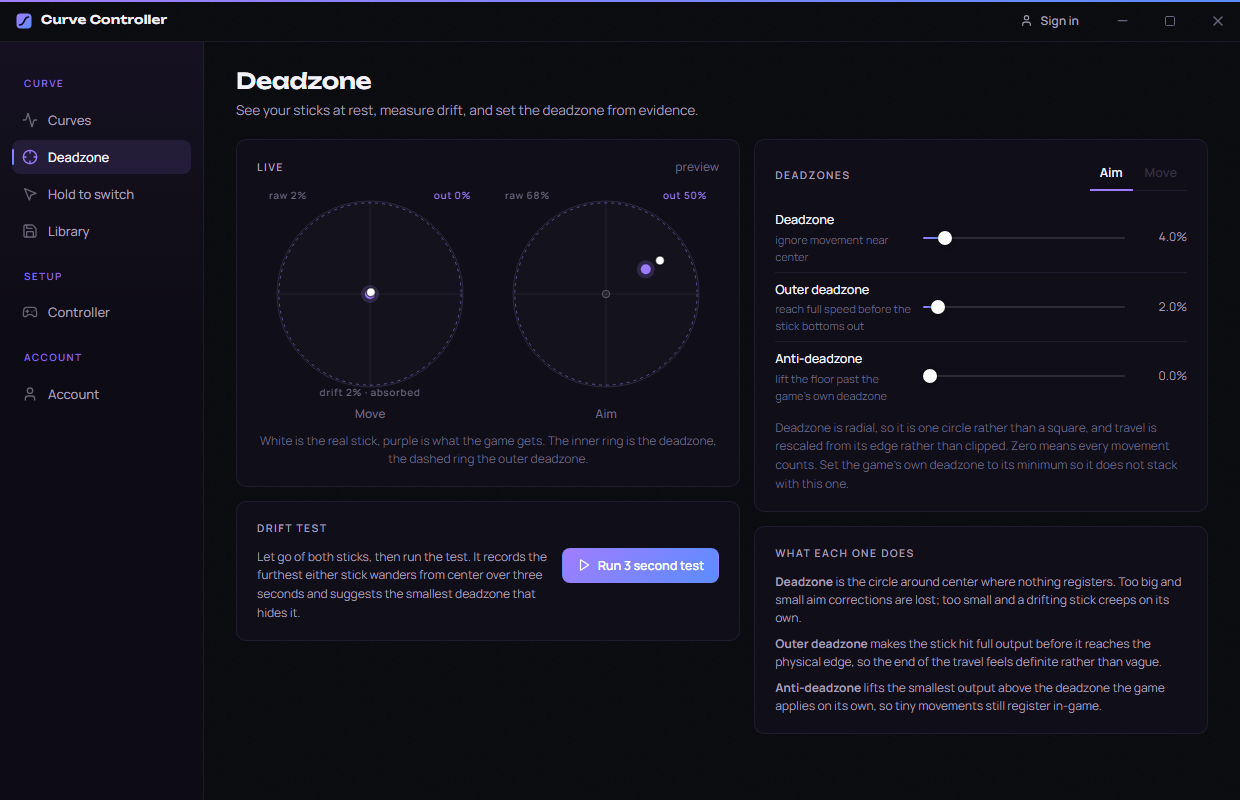
  • Radial, not square. One circle, with travel rescaled from its edge instead of clipped.
  • Outer deadzone so the stick hits full output before it bottoms out.
  • Anti-deadzone to lift the floor past a game's own deadzone.
The Deadzone tab: live stick view for both sticks, a drift test, and sliders for deadzone, outer deadzone and anti-deadzone
03 Premium

A second curve on a held button

Hold a trigger or bumper and the aim stick switches to a different curve. Expo while you aim, linear while you build or drive, no menu in between.
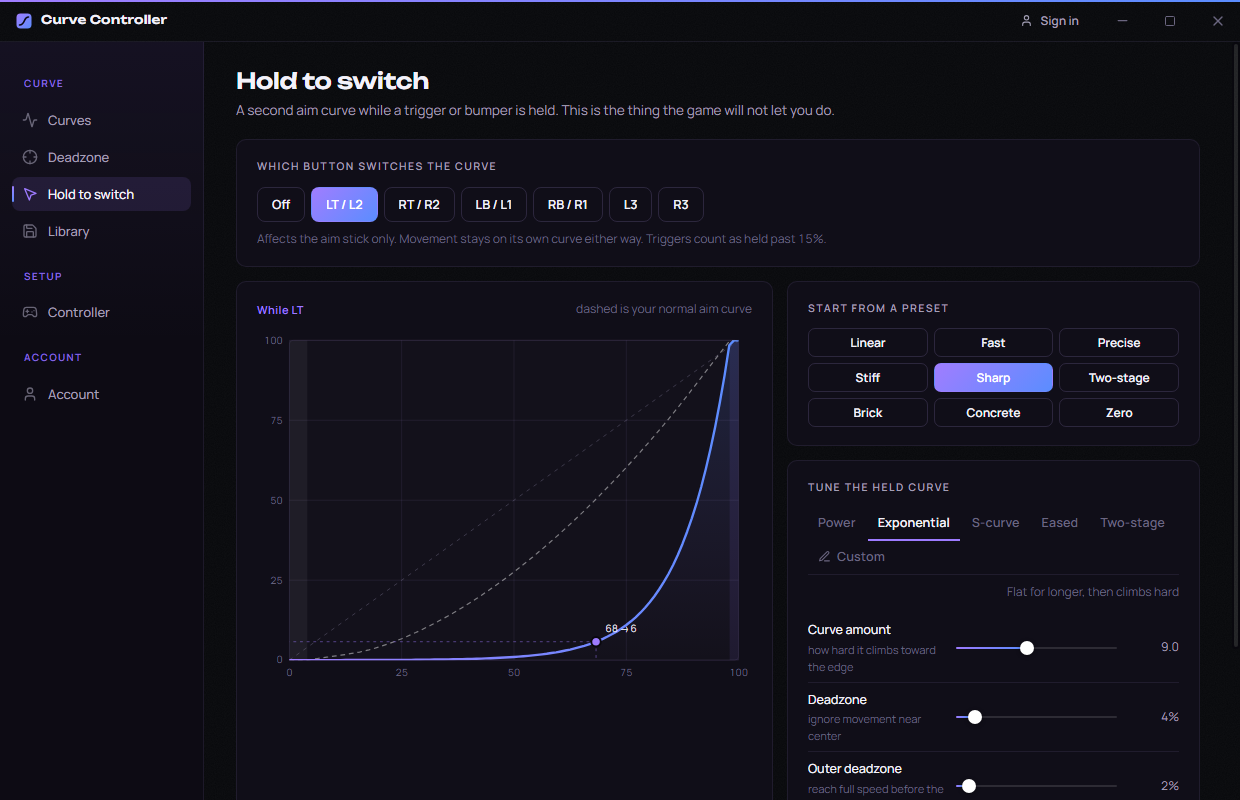
  • A trigger, a bumper, or a stick click. Triggers count as held past 15 percent.
  • Instant, on the same loop that reads the stick.
  • Shown on the graph so you can tune both curves side by side.
The Hold to switch tab: choose a button and a second curve that applies while it is held
04 Premium

Save it, share it as a code

Every curve you keep becomes a short code. Paste it in a video description or a Discord message and anyone can load the exact curve, both sticks and the hold button included.

  • Unlimited saved curves in the library.
  • One paste to load a code from a creator you follow.
  • Free accounts can preview any shared curve on the graph before upgrading.
PreciseShared curve
Open the share page
And the rest

The small things are the things you notice.

Nine presets

From Linear to Brick, loosest to stiffest, each one named for how it feels rather than for a game.

Five shapes to tune

Power, exponential, S-curve, eased and two-stage, each with a curve amount, range and vertical damping.

Live stick view

White is the real stick, purple is what the game gets. Watch the curve work while you move.

Tray and hotkey

Ctrl+Alt+S turns the curve on or off from inside a game. Close to tray, launch with Windows.

Hidden, then restored

The real pad is hidden while the curve runs so games see only the shaped one. Every start clears the last session, so a crash can never leave a controller hidden.

Nothing generated

No macros, no recoil help, no input you did not make. It reshapes your stick and nothing else.

How it works

Your stick, reshaped, handed to the game as a normal controller.

Two open-source drivers do the work: ViGEmBus provides the virtual controller and HidHide hides the real one. Both are MIT licensed and used by Steam Input, DS4Windows and reWASD.

01
Your controller
Read over XInput, or raw HID for PlayStation pads.
02
The curve
Applied to the stick magnitude, every poll.
03
Virtual Xbox pad
ViGEmBus receives the shaped values.
04
Real pad hidden
HidHide keeps everything else from seeing it.
05
The game
Sees one standard controller and nothing else.
Pricing

Free to start. Premium when you want all of it.

No trial, no card to start. The free tier is the real app with three presets. Premium is one price, cancel any time.

Free
$0
Everything you need to feel the difference.
  • Three presets: Linear, Concrete and Zero
  • Both sticks, any pad, every game
  • Live stick view and the drift test
  • Preview any share code on the graph
  • Tray icon, hotkey, launch with Windows
Download for Windows
About 90 MB. Two driver installs and one restart.
Premium
$9.99a month
Every curve, every slider, drawn by hand if you like.
  • Draw your own curve with draggable nodes
  • All nine presets and five shapes to tune
  • Every slider: amount, deadzones, anti-deadzone, range, vertical damping
  • Separate aim and move curves
  • A second curve on a held button
  • Unlimited saved curves and your own share codes
Get Premium
Pay with the email you use in the app. Create your account in the app first, check out with that same email, and Premium unlocks on its own the moment the order goes through. Checkout runs through EMTweaks, our store.
Setup

Three minutes, one restart.

Install and restartTwo small open-source drivers go in. Restart once and your controller is ready.
Pick a curve, turn it onStart from a preset or draw your own. Turn the curve on, then open the game.
Set the game to linearIn the game's own settings use the linear curve and the lowest deadzone, so it adds nothing on top of yours.
Turn the curve on before you open a game or Steam. Both bind the controllers they see at launch and will not pick up the shaped one afterwards. If a game is already open, close it, turn the curve on, then open it again.
Questions

Things people ask before they install.

What is a response curve, and why would I want one?

A response curve maps how far you push the stick to how much the game receives. Linear is one to one. A curve that sits below linear near center gives you finer control for small aim corrections while still reaching full speed at the edge. Most games only offer a few fixed options. Curve Controller lets you pick, tune, or draw the exact shape.

Which controllers work?

Xbox controllers of every generation, the PlayStation DualSense and DualShock 4, and third-party pads from 8BitDo, PowerA, Razer and others. Wired or Bluetooth. Xbox pads are read over XInput and PlayStation pads over raw HID, so there is nothing to configure.

Which games work?

All of them. The game sees a standard Xbox 360 controller, which is the most widely supported controller on Windows. That includes Steam, the Epic Games launcher, Game Pass, Battle.net and anything else that takes a controller.

Is it safe to use with anticheat?

Curve Controller never reads or touches the game. It reshapes stick input in a separate process and presents it through ViGEmBus, the same open-source virtual controller driver used by Steam Input and DS4Windows. It never generates input you did not make, which is the line that separates this from macro devices.

Does it add latency?

The loop is event driven rather than polled, so it reacts the moment the stick reports. The app shows its own timing while the curve is on, and it is a small fraction of a single frame.

Do I need to change anything in the game?

Two things. Set the game to its linear curve and lowest deadzone so it adds nothing on top of yours, and turn Curve Controller on before you open the game or Steam.

How does Premium billing work?

Premium is $9.99 a month through our store, EMTweaks. Pay with the same email you use in the app and it unlocks on its own the moment the order goes through. Cancel any time from the store and you keep Premium until the end of the month you paid for. If you paid with a different email, the Account tab in the app has a claim form that links the order to your account.

Can I use the free version forever?

Yes. The free tier is the full app with three presets, both sticks, the live view and the drift test. There is no trial that runs out.

I make content. Is there an affiliate program?

Yes. Apply from the Account tab in the app with your socials. Once approved you get a creator code, and you earn a commission on the first purchase of everyone who signs up with it.

Get started

Your controller should respond the way you want it to.

Download, pick a curve, and feel the difference in the first match. Free to start.